Agent Workload Attestation Extension
The Agent Workload Attestation Extension is an executable you supply that runs on each agent host. When a workload requests a SPIFFE Verifiable Identity Document (SVID), the agent passes the attributes it collected to the executable, which returns custom attributes to add to the request or an error that fails attestation.
This method runs on the agent host during workload attestation. For enriching or denying SVID issuance from a central webhook, see the Server Workload Attestation Extension. For extending agent attestation (when the agent connects to the Trust Domain Server), see the Agent Attestation Extension. For extending serverless attestation (when workloads request SVIDs directly, without an agent), see the Serverless Attestation Extension.
Why use an agent extension
The agent extension runs where the workload runs, so it can read state from the host that the agent doesn't have a built-in way to collect. Use it when the attributes you need are local to the workload. For example:
- Hardware-specific attestation. Detect and attest specialized hardware such as GPUs, TPUs, or HSMs.
- Binary verification. Check a workload executable's hash or signature before its identity is issued.
- Host-local context. Read node labels, mounted device inventories, or files that only exist on that machine.
Attributes that come from a central system instead, such as a CMDB lookup or an organization-wide policy decision, belong in the Server Workload Attestation Extension instead. A single deployment can use both.
How it works
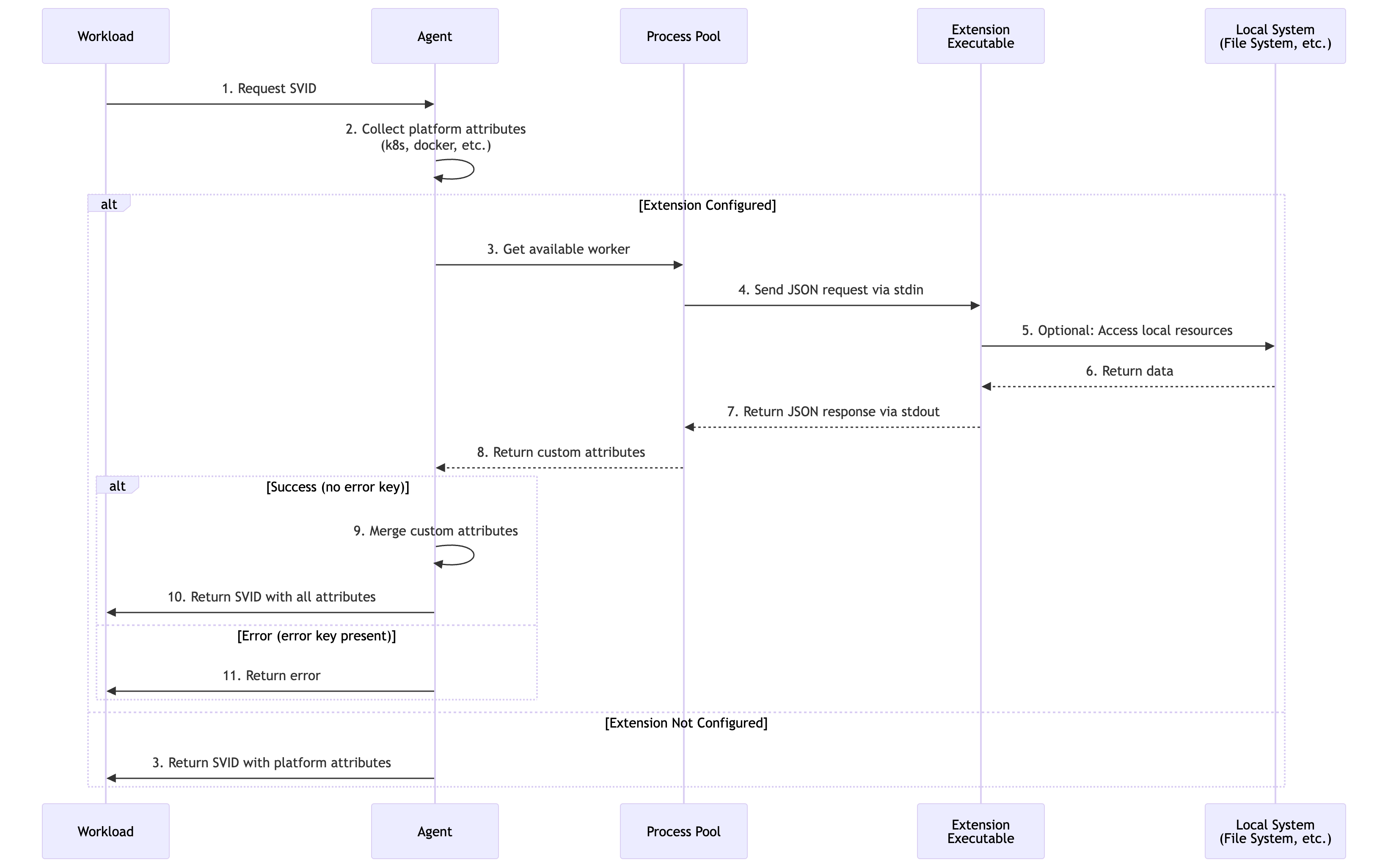
The agent maintains a pool of long-running extension processes and communicates with them over stdin and stdout.
- Workload requests an SVID. The agent collects platform attributes locally.
- Extension invocation. The agent sends a JSON request to an extension process via stdin.
- Local enrichment. The executable processes the attributes and reads whatever local resources it needs.
- Response processing. The agent receives custom attributes or an error via
stdout. - SVID request. The agent forwards the platform and custom attributes together to the Trust Domain Server.
Attributes available for SVID issuance
Custom attributes returned by the executable have the origin custom. The attribute names are defined by your implementation.
| Attribute | Description |
|---|---|
custom.<key> | Any key returned in the executable's JSON response |
Example SPIFFE ID path template using extension-returned attributes:
/{{custom.node_type}}/{{kubernetes.pod.namespace}}
Custom attributes are subject to Attribute Redaction like any other attribute. An allowlist that omits custom.* drops them before they reach the server.
Configuration
The agent extension is configured through the spirl-system Helm chart, under agent.extensionWorkloadAttestation.
This extension is configured through Helm values. Changes require a helm upgrade, and because the agent runs as a DaemonSet, they take effect as the agent pods roll across the fleet. Plan the change as a rollout.
Helm values
agent:
  extensionWorkloadAttestation:
    # Path to the extension executable
    # If empty or not specified, the extension is disabled
    cmd: "/usr/local/bin/custom-attestor"

    # Arguments to pass to the executable
    args:
      - "--mode=production"
      - "--region=us-east-1"

    # SHA256 checksum for integrity verification
    checksum: "sha256:e3b0c44298fc1c149afbf4c8996fb92427ae41e4649b934ca495991b7852b855"

    # Request timeout (Go duration format)
    timeout: "200ms"
Configuration reference
| Field | Type | Required | Default | Description |
|---|---|---|---|---|
cmd | string | When enabled | — | Absolute path to the executable. The extension is enabled only when this is set to a non-empty value |
args | []string | No | [] | Command-line arguments to pass to the executable |
checksum | string | No | "" | SHA256 checksum for integrity verification (format: sha256:<hex>) |
timeout | duration | No | 100ms | Maximum time to wait for the extension response |
Checksum verification
Generate the checksum for your executable with:
sha256sum /usr/local/bin/custom-attestor
# e3b0c44298fc1c149afbf4c8996fb92427ae41e4649b934ca495991b7852b855  /usr/local/bin/custom-attestor
# Use in config: sha256:e3b0c44298fc1c149afbf4c8996fb92427ae41e4649b934ca495991b7852b855
When checksum is set, the agent verifies the executable's SHA256 hash and refuses to run it on a mismatch. Updating the executable therefore requires updating the configured checksum in the same change.
Non-Kubernetes agents
Outside Kubernetes, configure the extension with CLI flags. args repeats once per argument:
spirl-agent \
  --extension-workload-attestation-exec-cmd=/usr/local/bin/custom-attestor \
  --extension-workload-attestation-exec-args=--mode=production \
  --extension-workload-attestation-exec-args=--region=us-east-1 \
  --extension-workload-attestation-exec-checksum=sha256:e3b0c44298... \
  --extension-workload-attestation-timeout=200ms
See Linux installation for the full agent flag reference.
Extension protocol
The executable is a long-running process that exchanges newline-delimited JSON with the agent: One request per SVID request on stdin, one response per line on stdout.
Request (sent by the agent via stdin)
{
  "_meta": {
    "version": "1.0"
  },
  "kubernetes": {
    "pod": {
      "name": "app-7d4f5c8b9-xk2lm",
      "namespace": "production"
    }
  },
  "pid": "1234"
}
| Field | Description |
|---|---|
_meta.version | Protocol version. Must be exactly "1.0" |
pid | Process ID of the workload requesting the SVID |
<attestor_key> | Attributes collected by the enabled workload attestors, nested by origin |
Success response (returned via stdout)
Write a flat JSON object. Every key becomes a custom.* attribute:
{
  "node_type": "gpu-enabled",
  "gpu_count": "4"
}
Error response (returned via stdout)
{
  "error": "GPU detection failed"
}
A non-empty error, or exceeding timeout, fails workload attestation.
What the workload experiences
A failure does not reach every workload the same way, and the difference matters when you are deciding how applications should react:
- X.509-SVID requests stream, and the agent does not forward the error. The workload's request hangs until the agent succeeds or the workload's own timeout fires. The application sees no gRPC error, only the absence of a credential.
- JWT-SVID requests are unary, and the error is returned to the workload as a gRPC error.
When configured, the extension must produce a valid response for SVID issuance to continue. If it fails for any reason the agent never sends the SVID request to the Trust Domain Server.
Minimal example
A shell script that demonstrates the protocol and nothing else:
#!/bin/bash

# Adds a timestamp attribute to every workload request.
# Requires: jq (JSON processor)

while IFS= read -r line; do
    if echo "$line" | jq . >/dev/null 2>&1; then
        pid=$(echo "$line" | jq -r '.pid // "unknown"')
        timestamp=$(date -u +"%Y-%m-%dT%H:%M:%SZ")
        echo "{\"attestation_time\":\"$timestamp\",\"attested_pid\":\"$pid\"}"
    else
        echo "{\"error\":\"invalid JSON input\"}"
    fi
done
Given the request:
{"_meta":{"version":"1.0"},"kubernetes":{"pod":{"name":"app-pod","namespace":"production"}},"pid":"1234"}
it responds:
{"attestation_time":"2026-02-21T10:30:45Z","attested_pid":"1234"}
For complete implementations that build, deploy, and verify an extension, see Extension Examples.
Example configurations
GPU detection
agent:
  extensionWorkloadAttestation:
    cmd: "/usr/local/bin/gpu-detector"
    timeout: "200ms"
    checksum: "sha256:a1b2c3d4e5f6..."
See GPU Detection for the implementation.
Binary verification
agent:
  extensionWorkloadAttestation:
    cmd: "/usr/local/bin/binary-verifier"
    timeout: "100ms"
    checksum: "sha256:b2c3d4e5f6a7..."
See Binary Verification for the implementation. That example gates issuance on the linux.binary.sha256 attribute, which requires discoverWorkloadPath on the Linux attestor.
Disabling the extension
Remove the extensionWorkloadAttestation block, or clear cmd. Workload attestation continues using the enabled platform attestors alone.
agent:
  # extensionWorkloadAttestation removed — extension disabled
Operational considerations
Process management
- Process pool. The agent launches the executable once and reuses the process across requests, so startup cost is paid at agent start rather than per SVID.
- Restart behavior. The agent restarts a failed extension process automatically.
- Graceful shutdown. The executable should exit cleanly when
stdincloses. - Resource limits. Size CPU and memory limits for the agent to include the extension processes.
Security
- Set
checksumin production. Without it, replacing the file atcmdsilently changes attestation behavior on every node. - Assume agent privileges. The extension is launched as a child of the agent process and inherits its user and capabilities, so it starts with whatever access the agent has. Drop privileges inside the executable if it does not need them.
- Restrict file permissions on the executable, for example mode
755owned by root. Anything that can write tocmdcan change attestation on that node. - Validate all JSON input before acting on it.
Performance
The extension runs on the SVID issuance path for every workload on the node, and the default timeout is 100ms.
- Stay inside the timeout. Processing must finish within
timeouton every request, not on average. - Prefer local reads over network calls.
- Cache anything stable for the process lifetime, such as hardware inventory.
- Keep dependencies minimal so the process stays small and fast to start.
Monitoring and logging
Write logs to stderr only. stdout is reserved for protocol responses, and anything else written there is parsed as a response.
Agent logs record extension activity:
INFO Extension process started {"cmd": "/usr/local/bin/custom-attestor"}
DEBUG Extension request {"pid": "1234"}
INFO Custom attributes collected {"count": 2}
ERROR Extension failed {"error": "..."}
See the Agent Runbook for the response procedure when a custom attestor errors or times out.
Rolling out safely
- Test on a non-production cluster first.
- Roll out to a single node pool before the whole fleet, since a failing extension denies SVIDs on every node that has it.
- Watch agent logs for startup failures, checksum mismatches, and timeouts.
- Confirm the custom attributes appear in issued SVIDs. Inspect a real credential with spirldbg rather than stopping at the agent logs.
- Exercise the failure path deliberately, including an executable that returns
errorand one that exceeds the timeout.
Troubleshooting
Executable not found — Confirm cmd is an absolute path, the file exists on every agent node, and it is executable. Review agent logs for the specific error.
Checksum mismatch — Regenerate with sha256sum /path/to/executable and update the configuration. This occurs whenever the executable is updated without updating the configured checksum, and it is worth confirming the change was intentional before overwriting the value. Check the executable on every agent node, not just one: A partial rollout leaves nodes on different builds, so the mismatch may affect only part of the fleet.
Timeout errors — Raise timeout, profile the executable, and reduce I/O or external dependencies. Values above roughly 1s add noticeable latency to every workload's startup.
Custom attributes not appearing in the SVID — Confirm the executable writes a flat JSON object to stdout and nothing else. Check that attribute names do not collide with platform attributes, that the SPIFFE ID template or customization template references them, and that Attribute Redaction is not filtering them out.
Extension returning errors — Read the executable's stderr in the agent logs, then replay a sample request through it by hand. Confirm the local resources it depends on are present on the node.
Implementation notes
Beyond the protocol above, two behaviors are easy to miss and cause failures that look like timeouts:
- Flush after every response. A buffered write leaves the agent waiting until the buffer fills, which presents as a timeout rather than as a bug in the extension.
- Never exit on a bad request. Return
{"error": "message"}and keep reading. The agent restarts a crashed process, but every request in flight during the restart fails.
Guided examples
Two end-to-end walkthroughs build, install, and verify an executable against this extension point:
- GPU Detection — Report the node's accelerator inventory as custom attributes
- Binary Verification — Fail attestation when a workload's binary hash is not on an approved list
See Extension Examples for the full set, including the server-side surface.
Related configuration
- Server Workload Attestation Extension — Enrich or deny SVID issuance from a central webhook
- Workload Attestation Methods — The platform attestors whose attributes your extension receives
- SPIFFE ID templates — Use custom attributes in SPIFFE ID construction
- X.509-SVID customization — Include custom attributes in certificate fields and extensions
- JWT-SVID customization — Add custom attributes as JWT claims
- Attribute Redaction — Control which attributes the agent forwards to the server