Kubernetes Integration
The Ledger Kubernetes integration scans and ingests application and secret data from Kubernetes clusters. It discovers application workloads and links them to secrets found by other integrations, such as AWS IAM access keys or Entra Application Client Secrets. Once linked, Ledger guides you through eradicating static secrets using Mint-issued short-lived credentials.
The integration discovers secrets consumed by applications through inline environment variables or mounted ConfigMaps and Secrets. It also scans API Server metadata to identify the underlying host platform, and detects any Mint installations to link applications to Mint-issued identities.
For Amazon EKS clusters, Ledger can also discover secrets and applications remotely through the AWS integration, with nothing installed directly in the cluster. See EKS cluster scanning for how that option differs, including how it handles secret values.
What Data is Collected?
- Applications - Deployments, StatefulSets, DaemonSets, CronJobs, and Jobs.
- Secrets - Metadata about environment variables, Kubernetes Secrets, and ConfigMaps that contain suspected credentials (e.g. key name, resource name, and detected type).
- For Anthropic and OpenAI keys detected in pod environment variables, the integration reads raw values in-cluster to compute fingerprints and redacted hints, which are used to correlate keys with those identified by the Anthropic and OpenAI integrations. Values from other providers are pattern-matched in-cluster as well, and only non-secret identifiers (e.g. AWS access key IDs, Entra client IDs) and short hints matching what the source system itself displays are recorded. Secret values never leave your environment, and are never logged or stored in scan results.
- Metadata - Nodes and ServiceAccounts to provide information on the underlying Kubernetes runtime, such as cloud provider and region.
Supported Remediations
- Migrations: Migrate static secrets in Kubernetes to Mint-issued short-lived credentials.
Integration Permissions
The integration runs as part of a StatefulSet that requires the following ClusterRole:
Kubernetes Integration ClusterRole YAML
apiVersion: rbac.authorization.k8s.io/v1
kind: ClusterRole
metadata:
  name: spirl-ledger-scanner
  labels:
    app.kubernetes.io/name: spirl-ledger-scanner
    app.kubernetes.io/instance: spirl-system
rules:
- apiGroups: ["apps"]
  resources: ["daemonsets"]
  verbs: ["get", "list", "watch"]
- apiGroups: ["apps"]
  resources: ["deployments"]
  verbs: ["get", "list", "watch"]
- apiGroups: ["apps"]
  resources: ["statefulsets"]
  verbs: ["get", "list", "watch"]
- apiGroups: ["batch"]
  resources: ["cronjobs"]
  verbs: ["get", "list", "watch"]
- apiGroups: ["batch"]
  resources: ["jobs"]
  verbs: ["get", "list", "watch"]
- apiGroups: [""]
  resources: ["secrets"]
  verbs: ["get", "list", "watch"]
- apiGroups: [""]
  resources: ["configmaps"]
  verbs: ["get", "list", "watch"]
- apiGroups: [""]
  resources: ["namespaces"]
  verbs: ["get", "list", "watch"]
# Cluster classification (ClusterInfoCollector): node providerID/labels and
# IRSA ServiceAccount annotations are read to derive cloud provider/region/account.
- apiGroups: [""]
  resources: ["nodes"]
  verbs: ["get", "list", "watch"]
- apiGroups: [""]
  resources: ["serviceaccounts"]
  verbs: ["get", "list", "watch"]
Installation
This integration supports only a Runtime installation mode.
The integration is installed in your environment using the spirl-system Helm chart, and data is transmitted back to the Defakto Control Plane.
If you are already using the spirl-system Helm chart to deploy Defakto Mint, you can upgrade the chart to >=0.41.0 and modify the existing Values to include the Ledger integration configuration.
Prerequisites
The operator installing the integration should have broad write permissions to the cluster to install resources through the Helm chart, including ClusterRoles and ClusterRoleBindings. We also recommend installing the chart in a dedicated namespace if you do not already have it installed as part of Mint.
You'll require a Helm-compatible tool to install the spirl-system chart.
Installation Steps
- Visit the "Integrations" page in the Defakto Console. Click "Create Integration".
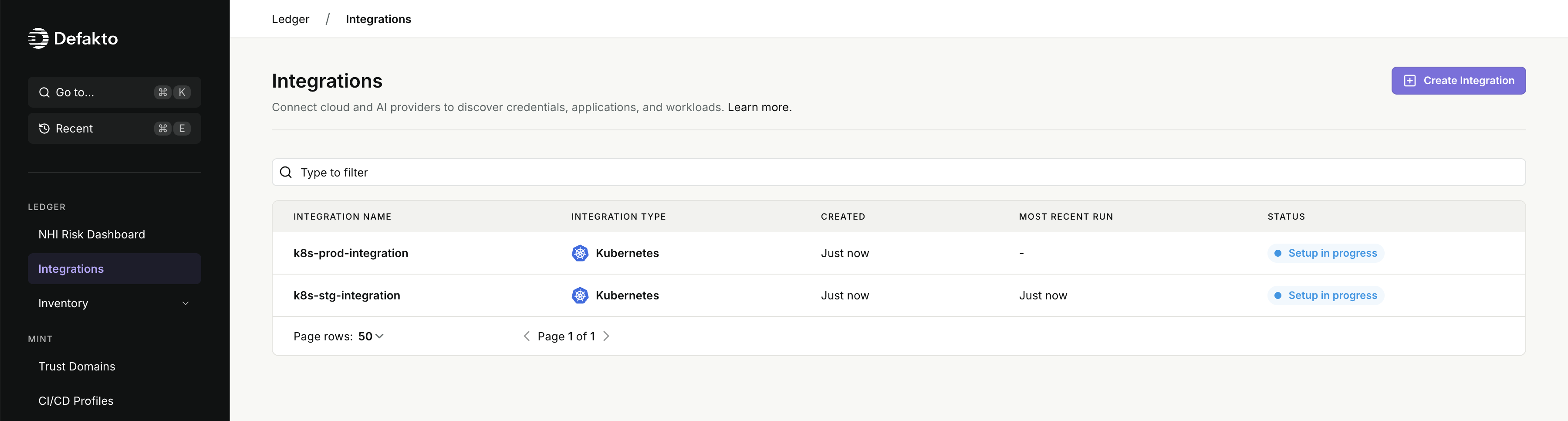
- Select "Kubernetes" from the list of available integrations. Configuring the following fields, then click "Next Step" to continue.
- Integration Name: A unique name for this integration. This will be used to identify the integration in the Console and CLI. (required)
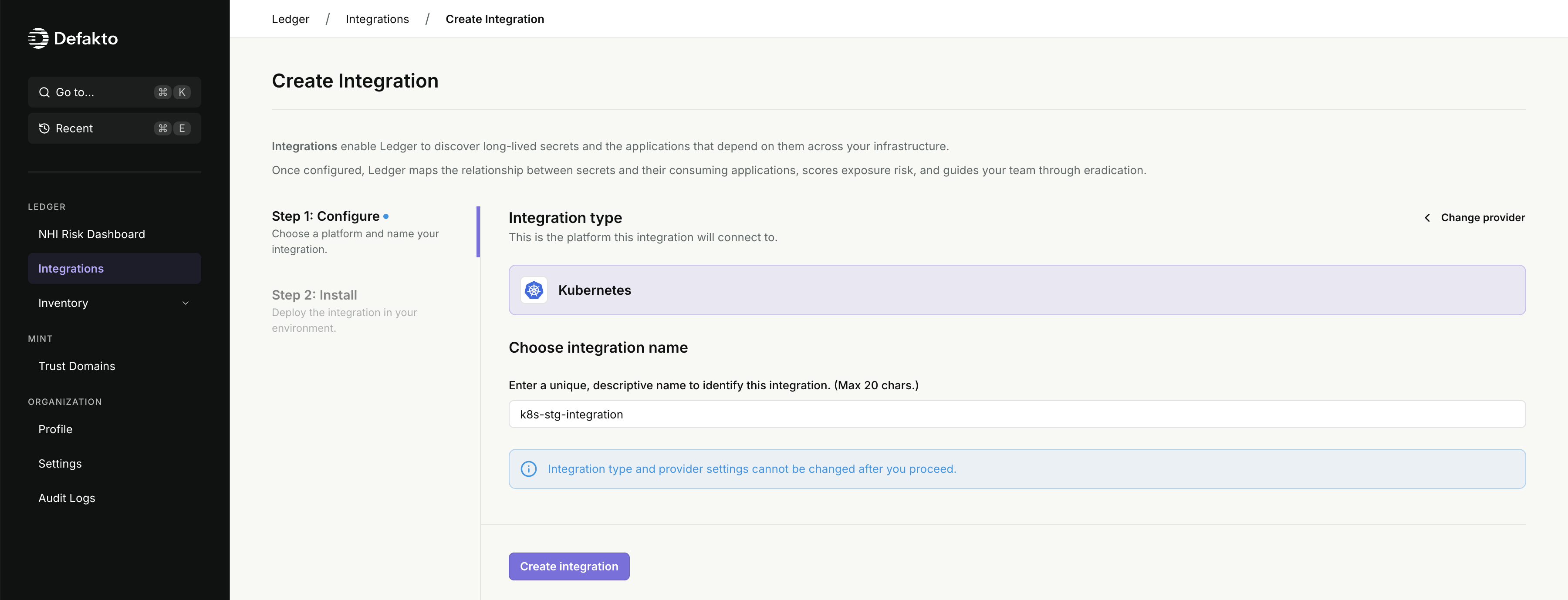
- Integration Name: A unique name for this integration. This will be used to identify the integration in the Console and CLI. (required)
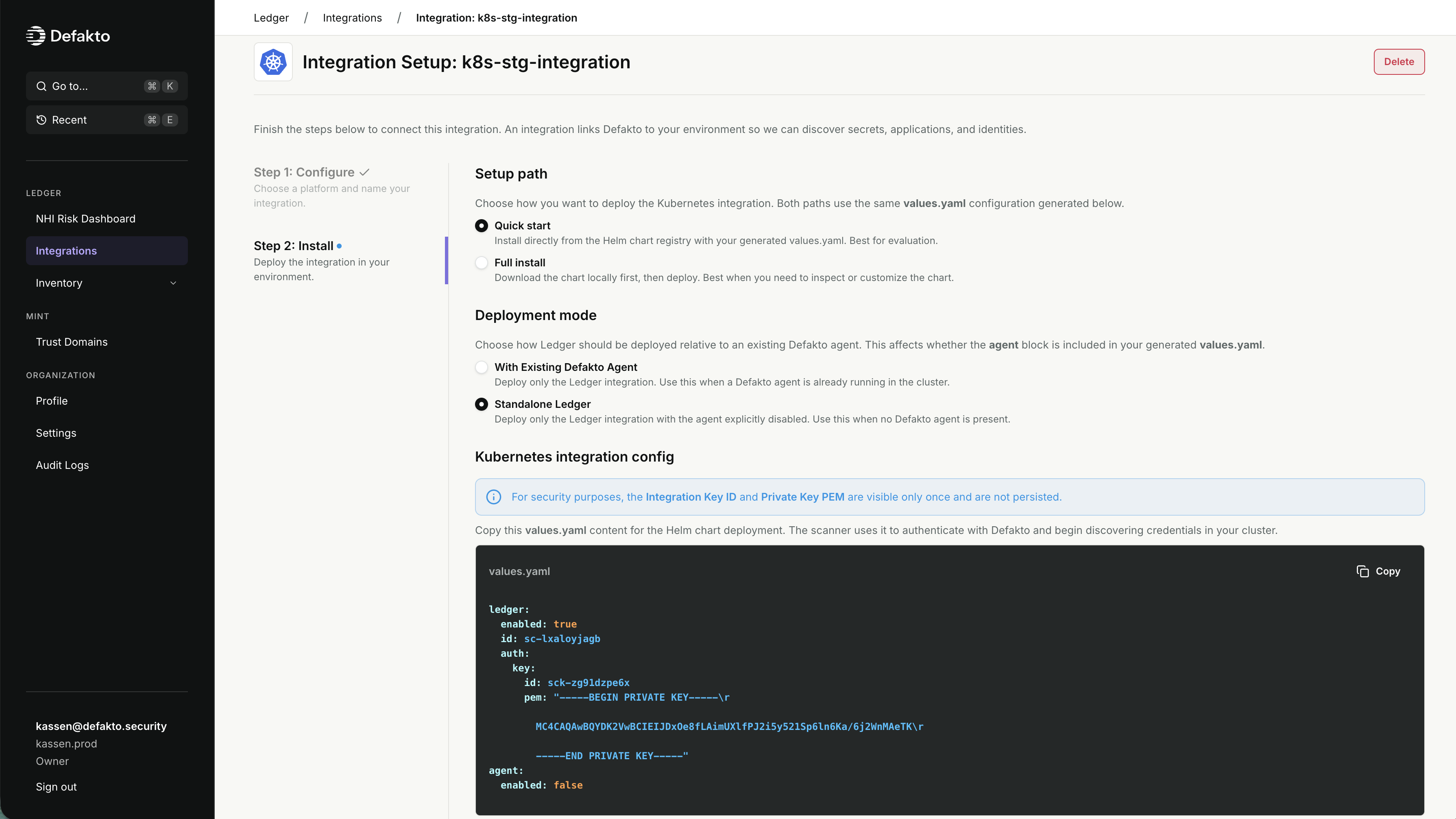
- Select one of the "Setup path" options. The values for the Helm chart are the same regardless of the option you choose. If you aren't using the Helm CLI for installation, you can leave the default.
- Quick Start: The install/upgrade Helm command installs the chart directly from the Defakto public Helm repository. It will use the latest chart.
- Full Install: The Helm commands presented first download the chart locally, giving you the opportunity to inspect the chart and values before installation.
- Use the provided Helm values to install the Kubernetes integration.
note
The auth keys presented in the values are only displayed once while setting up the integration. If you lose these values, you will need to delete the integration and start over. Consider storing these values securely in a password manager or secret vault.
- If you are installing from the CLI into a cluster without Mint, download the values files and follow the instructions to install the chart.
- If you are installing using another tool to manage your Helm charts, you can copy the provided values, chart repo, and chart name, and add to your existing tooling. Skip ahead to "Checking integration status".
- If you are installing into a cluster that already has Mint deployed, you can copy the provided values and add them to your existing
spirl-systemchart configuration. Skip ahead to "Checking integration status".
warningIf you are using the
spirl-systemHelm chart to deploy Defakto Mint, ensure you do not accidentally disable any of the existing components, such as settingagent.enabled=false. The Console does not have prior knowledge of where the chart will be installed, so it is possible to misconfigure it in standalone Ledger mode. This misconfiguration could inadvertently disable essential Mint components.
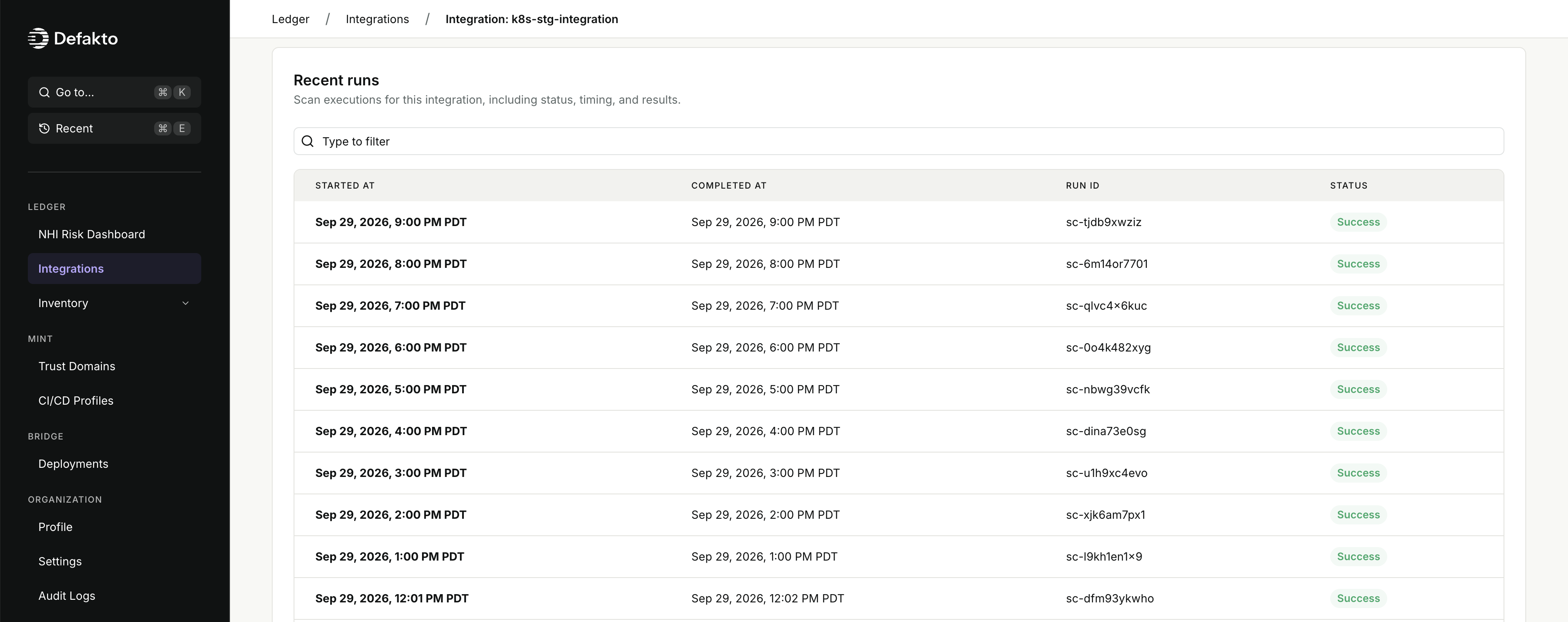
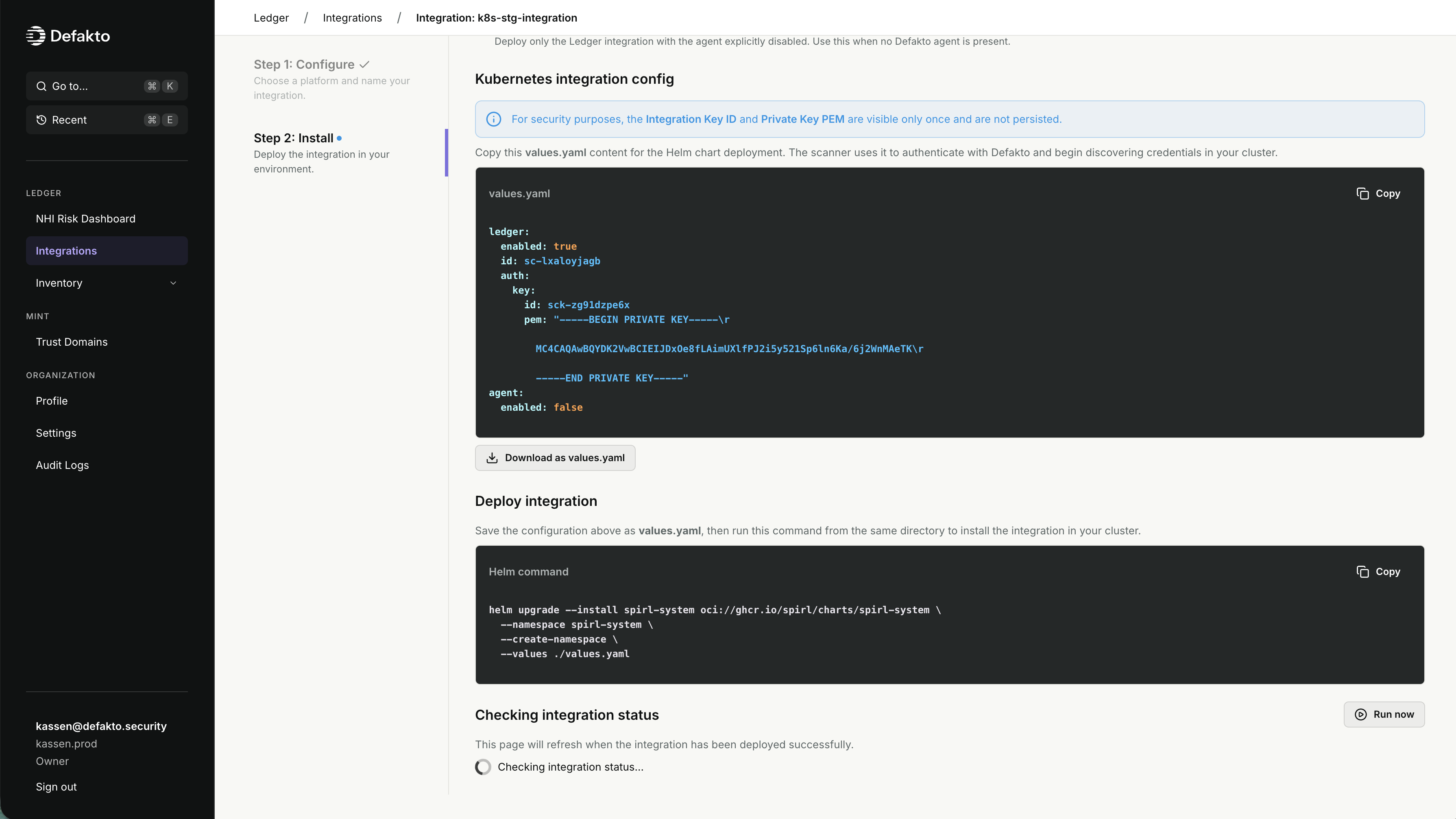 5. Under the "Checking integration status" section of the Console, you can monitor the status of the integration installation. Once the integration is successfully installed and the connection is verified, you'll see a confirmation message and the option to navigate to the integration details page.
Caveats
- The following host environments can be detected by this integration:
- AWS: detects whether the cluster is running on EKS, along with the region and account ID.
- Azure: detects whether the cluster is running on AKS, along with the region and subscription ID (tenant ID is not available).